If you've ever used Microsoft Teams, stored files on OneDrive, or run your business on Azure — you've already relied on a Microsoft data center without even realizing it.
But what exactly goes on inside these massive facilities? How many are there? And why does it matter where your data lives?
These are fair questions. And as Microsoft continues its aggressive global expansion — investing hundreds of billions into infrastructure — the answers matter more than ever for businesses, developers, and everyday users alike.
In this article, you'll learn exactly what Microsoft's data center network looks like today, how it works, what makes it different from competitors, and what you should know if you're thinking about building on Azure.
Let's get into it.
1. What Is a Microsoft Data Center?
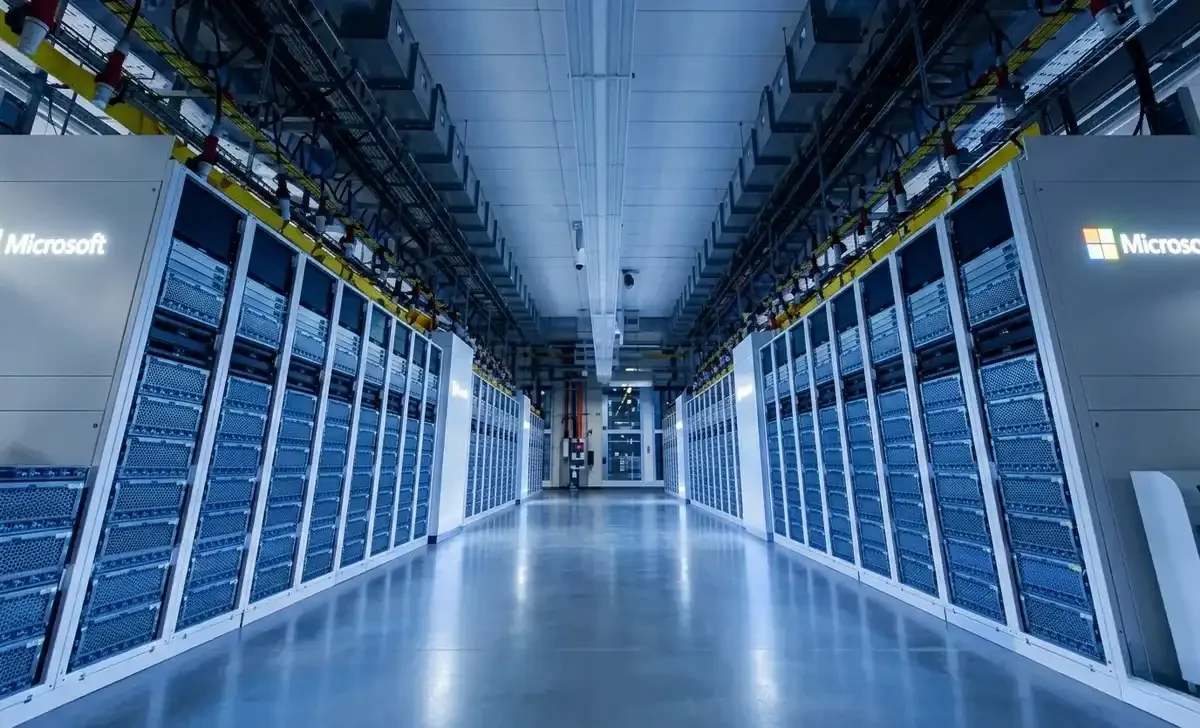
A Microsoft data center is a large, purpose-built facility that houses the physical servers, networking equipment, and storage systems that power Microsoft's cloud services — including Azure, Microsoft 365, Xbox Live, LinkedIn, and Bing.
Think of it as the engine room of the internet, hidden behind clean interfaces and login screens.
These facilities are climate-controlled, heavily secured, and designed with multiple layers of redundancy so that if one system fails, another kicks in instantly. Power, cooling, and connectivity are all engineered to work around the clock without interruption.
What makes Microsoft's data centers unique is the sheer scale of investment. The company has committed to spending over $80 billion on data center infrastructure in fiscal year 2025 alone — more than half of which is going into the United States.
For businesses using Azure, this translates directly into faster services, better uptime, and more geographic options for where their data lives.
2. How Many Microsoft Data Centers Are There?
Microsoft doesn't publish an exact count, but the company operates more than 300 data centers across over 60 countries. This makes it one of the three largest data center operators in the world, alongside Amazon Web Services (AWS) and Google Cloud.
These aren't just server rooms. Many Microsoft facilities span hundreds of thousands of square feet and consume as much electricity as a small city.
Here's a quick breakdown of how the network is structured:
- Hyperscale data centers — Massive campuses that handle enormous workloads for Azure and Microsoft 365
- Regional data centers — Smaller hubs that reduce latency for users in specific geographies
- Modular/container-based facilities — Portable units used in edge and hybrid deployments
- Submarine cable infrastructure — Microsoft co-owns undersea cables connecting continents for faster global data transfer
The number of facilities is growing rapidly, driven primarily by demand for AI workloads, which require far more computing power than traditional cloud tasks.
3. Microsoft Azure Regions vs. Data Centers — What's the Difference?
This is a common point of confusion, so let's clear it up.
An Azure region is a geographic area — like "East US" or "UK South" — that contains one or more data centers physically located close together. When you deploy a service on Azure and choose a region, you're choosing which set of data centers will run your workload.
An availability zone takes this further. Each Azure region has at least three availability zones — separate physical locations within the same region, each with independent power, cooling, and networking. This means if one data center in a region goes down, your application can seamlessly shift to another.
Why does this matter for you?
- Choosing the right region affects latency (how fast your app responds for users)
- Compliance laws in some countries require data to stay within national borders
- Some Azure services are only available in certain regions
As of 2025, Microsoft Azure has over 60 announced regions globally — more than any other cloud provider. New regions in countries like Malaysia, Mexico, and New Zealand have either launched or are in active development.
4. Microsoft's Data Center Expansion Plans
Microsoft is in full expansion mode — and the numbers are staggering.
In early 2025, the company announced plans to invest $80 billion in new data center infrastructure during the fiscal year. This is being driven almost entirely by the explosive demand for AI services — a shift that is reshaping the entire infrastructure industry. Understanding the latest AI demand trends is essential context for anyone evaluating cloud strategy right now, as the pace of growth is influencing everything from hardware procurement to energy policy. Training and running large AI models requires specialized hardware — particularly NVIDIA GPUs and Microsoft's own custom AI chips — that only hyperscale data centers can support.
Key expansion areas include:
- United States — The largest share of investment, with new campuses in Virginia, Arizona, Wisconsin, and Texas
- Europe — Expansion in Germany, Spain, Poland, and the UK to meet growing enterprise and public sector demand
- Asia-Pacific — New facilities in Japan, India, and Australia
- Middle East and Africa — Data centers in UAE and South Africa to serve underserved markets
India in particular is emerging as a critical battleground for data center investment. Microsoft isn't the only player racing to build capacity there — major conglomerates are also staking their claim, as covered in this closer look at Adani's push into data center infrastructure. The competition is accelerating digital infrastructure development across the subcontinent.
Microsoft has also been acquiring land in less obvious places — smaller cities and rural areas where land is cheaper, power is more accessible, and water (used for cooling) is available.
The strategic push isn't just about storage. It's about becoming the dominant infrastructure layer for the AI era.
5. Energy and Sustainability Commitments
Running hundreds of data centers around the world consumes an enormous amount of electricity. Microsoft hasn't tried to hide this — in fact, the company has been unusually transparent about the environmental impact and its plans to address it.
Microsoft's core sustainability commitments include:
- Carbon negative by 2030 — The company aims to remove more carbon than it emits
- 100% renewable energy by 2025 — Matching all electricity consumption with renewable energy purchases
- Water positive by 2030 — Returning more water to communities than data centers consume
- Zero waste to landfill — Targeting circular use of hardware and packaging
The reality is more complicated. As AI demand grows, energy consumption has increased faster than expected. Microsoft's own sustainability reports acknowledge this tension — they're using more power even as they invest in cleaner sources.
On the cooling side, Microsoft has experimented with underwater data centers (Project Natick), liquid cooling for AI hardware, and underwater thermal exchange systems to reduce the reliance on traditional air cooling.
Whether Microsoft hits its 2030 goals remains to be seen — but the infrastructure investments in nuclear, solar, and wind energy are real and significant.
6. Security and Compliance Inside Microsoft Data Centers
Security at a Microsoft data center isn't just a firewall. It's a layered system designed to prevent, detect, and respond to both physical and cyber threats.
Physical security measures include:
- Multi-factor authentication for any access (biometrics + badge + PIN)
- 24/7 security personnel and perimeter monitoring
- Strict visitor protocols with escorted access at all times
- Video surveillance with long-term retention
- Unmarked facilities to avoid being obvious targets
Cybersecurity and compliance:
- Data is encrypted in transit and at rest using AES-256 encryption
- Microsoft operates under a Zero Trust security model — no one is automatically trusted, even inside the network
- Compliance certifications include ISO 27001, SOC 1 & 2, PCI DSS, HIPAA, FedRAMP, and many more
- Microsoft Defender and Sentinel monitor for threats in real-time across the infrastructure
For businesses in regulated industries — healthcare, finance, government — this compliance portfolio is one of the primary reasons they choose Azure over competitors.
7. Microsoft Data Center Locations: Key Hubs Around the World
While Microsoft operates globally, some locations serve as particularly important hubs:
United States:
- Northern Virginia — One of the highest-density data center corridors on the planet
- Des Moines, Iowa — A major hyperscale campus with significant investment
- San Antonio, Texas — Serves the southern US and Latin American markets
Europe:
- Dublin, Ireland — Serves as the primary hub for European Azure operations
- Amsterdam, Netherlands — High connectivity and favorable regulations
- Frankfurt, Germany — Critical for GDPR compliance and German enterprise customers
Asia-Pacific:
- Singapore — Southeast Asia hub
- Tokyo and Osaka, Japan — Paired availability zones for resilience
- Pune and Hyderabad, India — Rapidly growing markets with new investment
Other notable locations:
- Cape Town and Johannesburg, South Africa
- Abu Dhabi and Dubai, UAE
- Sydney and Melbourne, Australia
For businesses with global customers, this geographic spread means you can keep data close to your users — reducing latency and meeting local data residency requirements.
8. How Microsoft Data Centers Support Azure Cloud Services
Every Azure product you use — from a virtual machine to an AI model endpoint — runs on hardware inside a Microsoft data center.
Here's how the key services connect:
- Azure Compute (VMs, Kubernetes) — Runs on physical servers clustered across availability zones
- Azure Storage — Data is distributed across multiple storage nodes with automatic replication
- Azure AI / OpenAI Service — Requires GPU clusters, specifically provisioned in select data centers
- Azure Networking (ExpressRoute, CDN) — Uses Microsoft's private global backbone, not the public internet
- Microsoft 365 and Teams — Hosted on the same infrastructure, with dedicated capacity for enterprise tenants
The hardware powering AI workloads is also evolving quickly. Beyond GPUs, a new generation of AI-optimized CPUs is beginning to play a larger role in inference and mixed workloads — something worth tracking if you're designing AI-heavy architectures on Azure, as chip availability and capability directly influence what's possible in any given region.
One important thing many users don't realize: not all Azure services are available in all regions. AI and GPU-intensive services are concentrated in specific locations because the hardware is expensive and demand is still being managed. If you're building AI applications on Azure, check regional availability carefully.
9. Edge Computing and the Future of Microsoft's Infrastructure
The future isn't just about bigger centralized data centers — it's also about pushing compute closer to where it's needed.
Microsoft has been investing in edge computing through products like:
- Azure Stack Edge — Physical hardware devices that run Azure services on-premises or at the edge
- Azure Arc — Lets you manage hybrid and multi-cloud environments from a single control plane
- Azure Orbital — Cloud connectivity for satellites and remote deployments
The idea is to create a continuum of compute — from the hyperscale data center down to the edge device — all managed through Azure.
This matters for industries like manufacturing, healthcare, and defense, where data can't always travel to a central cloud. A factory floor with real-time robotics control can't afford the latency of sending data to a data center and waiting for a response. Edge compute solves this.
10. What This Means for Businesses Using Azure
If you're running workloads on Azure or considering it, the massive investment Microsoft is making in its data center network has direct practical implications:
- More regions mean more choices for data residency and lower latency for global users
- More AI capacity means Azure OpenAI services will become more available and less constrained
- Better redundancy means higher SLAs and fewer outages affecting your business
- Competitive pricing may improve as scale increases operational efficiency
- Faster innovation as new hardware (like custom AI chips) gets deployed globally
The main risk to watch: as Microsoft invests so heavily in AI infrastructure, some traditional Azure services may see slower innovation. If AI isn't central to your stack, evaluate whether you're getting the best value from your cloud provider.
Expert Tips
After reviewing how Microsoft's data center strategy is evolving, here are a few practical recommendations:
- Choose your Azure region carefully. Don't default to the nearest region — check service availability, compliance requirements, and latency benchmarks for your actual user base.
- Use Availability Zones. For anything business-critical, always deploy across multiple availability zones. Single-zone deployments are one outage away from downtime.
- Monitor your carbon footprint. Azure's Emissions Impact Dashboard gives you real data on the environmental cost of your workloads. Useful for ESG reporting and internal sustainability goals.
- Plan for AI capacity constraints. GPU-backed Azure services still face availability limitations. If AI is central to your roadmap, consider reserved capacity to lock in access.
- Use ExpressRoute for sensitive data. If you're sending sensitive data to Azure, private connectivity (not public internet) is worth the investment in security and reliability.
Common Mistakes to Avoid
- Assuming all Azure regions are equal. They're not. Service availability, pricing, and hardware capabilities vary significantly by region. Always check the Azure products by region page before architecting your solution.
- Ignoring data residency laws. If you operate in the EU, healthcare, or financial services, where your data is stored isn't optional — it's a legal requirement. Don't pick a region based on price alone.
- Skipping redundancy to save money. Redundancy costs a bit more upfront. An outage that takes down a customer-facing application costs a lot more. Build resiliency in from the start.
- Overlooking egress costs. Getting data into Azure is free. Getting it out is not. Many businesses are surprised by egress fees when they try to migrate away or sync large datasets with other platforms.
- Treating Microsoft's sustainability claims as guaranteed. Microsoft's environmental goals are ambitious and genuine — but they're goals, not guarantees. If sustainability is a compliance requirement for your business, do your own due diligence.
FAQs
Q1: Where are Microsoft data centers located?
Microsoft operates data centers in over 60 countries across North America, Europe, Asia-Pacific, the Middle East, and Africa. Major hubs include Virginia (USA), Dublin (Ireland), Singapore, and Tokyo (Japan).
Q2: How many Microsoft data centers are there in 2026?
Microsoft hasn't published an exact number, but estimates put the count at over 300 data centers globally, with more being built as part of a multi-year, multi-billion-dollar expansion.
Q3: What is the difference between a Microsoft data center and an Azure region?
An Azure region is a geographic cluster of one or more data centers. The data center is the physical building with the hardware; the Azure region is the logical boundary you choose when deploying cloud services.
Q4: Are Microsoft data centers environmentally friendly?
Microsoft has committed to being carbon negative by 2030 and 100% renewable energy by 2025. It invests in solar, wind, and nuclear energy, and is working to reduce water usage. However, AI-driven energy demand is a growing challenge.
Q5: Is my data safe in a Microsoft data center?
Yes — Microsoft data centers use multi-layered physical and cybersecurity systems, including biometric access controls, AES-256 encryption, Zero Trust architecture, and compliance certifications including ISO 27001, SOC 2, and FedRAMP.